Advanced Settings
Advanced settings have the format key = value. You can use “//” for comment row.
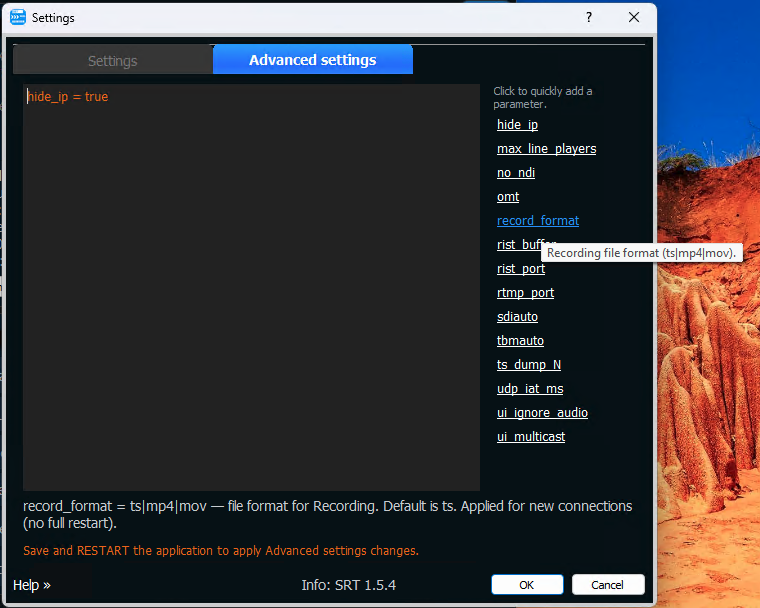
Available keys:
Addons
sdiauto = on — Use this flag if you want the SDI Out Addon to start automatically when the SRTMiniServer starts.
tbmauto = on — Use this flag if you want the TalkBackManager Addon to start automatically when the SRTMiniServer starts.
rtmp_port = 1935
sets TCP port on which RTMP Server addon will be started. After changing the value it is necessary to restart RTMP server (turn off/on “RTMP server” button).
rist_port = 7000
sets RIST port (UDP) for RIST Server addon.
rist_buffer = 500
sets the RIST receiver buffer in milliseconds.
rist_secret = …
encryption secret for the RIST Server addon. It is passed as &secret=…. Replace … with the real secret. After changing the value, restart the RIST Server (turn off/on the RIST server button). Full SRTMiniServer restart is not required.
Any key that starts with rist_ (except rist_port) is passed to the RIST server as a URL parameter: rist_buffer = 500 becomes &buffer=500, rist_secret = mypass becomes &secret=mypass and so on. If buffer and reorder-buffer are not set, SRTMiniServer uses 500 for both.
The full list of supported names (secret, aes-type, cname, rtt-min, rtt-max, bandwidth, return-bandwidth, session-timeout, keepalive-interval, username / password, etc.) is described in the librist documentation .
max_line_players = 100
sets the maximum number of connects per view on “feedbackplay” system (100 by default) forCrossLine addon
Dump and Recording
ts_dump_N = 1
this flag enables the mode of continuous recording of incoming TS streams into one ts-file.
The file will be located in the Record folder.
For example :
ts_dump_3 = 1
will enable this mode for line 3
record_format = ts|mp4|mov
sets file format for Recording option. By default is TS. New value applied for new connection so after change you not need restart SRTMiniServer.
Timecode Sync
sync_auto_control = true|false
In sync mode, it automatically drops frames or inserts a pause to maintain synchronicity. Default value is true.
ltc_cut = true|false
If the timecode field on the line is set to “from LTC”, by default the server cuts the last track from the output signal (ltc_cut = true).
If you need to keep it on the output, set this flag to false.
ntp_server = time.apple.com
sets the NTP server used by Timecode Sync. When you enable Timecode Sync, SRTMiniServer takes the reference time from this server (time.apple.com by default) and re-checks it every 5 minutes. Set your own NTP server here if the machine has no access to the internet.
Remote control PTZ
ptz_tcp = 0.0.0.0:5678 — ** ptz_udp = 0.0.0.0:1259** — Set the interface and port on which SRTMiniServer will receive commands from PTZ controller for further transmission of these commands to SRT StreamerPRO.
Read more here
NDI / OMT output
no_ndi = on
If you don’t need NDI output then you can totally disable NDI encoding. It allows save CPU perfomance.
Use no_ndi flag for disable NDI output by default.
note: you will be able to generate NDI via SDIOutAddon if needed
omt = low | medium | high
use it for activate OMT (OpenMediaTransport) output. By default is disable. Need restart.
UI options
These flags change what is shown in the GUI. All of them are applied right after Save, without restarting SRTMiniServer.
hide_ip = false|true
hide or show IP in GUI (default is false). Handy for screenshots and screen sharing.
The two flags below show controls that are hidden on the line by default. The controls appear (or disappear) immediately, but a line that is already running starts using the value only after the line is restarted.
ui_ignore_audio = true|false
shows the Ignore Audio control on each line. Hidden by default, and while it is hidden audio is never ignored.
ui_multicast = true|false
shows the Multicast to control (UDP multicast address) on each line. Hidden by default, and while it is hidden no multicast address is used.
Other
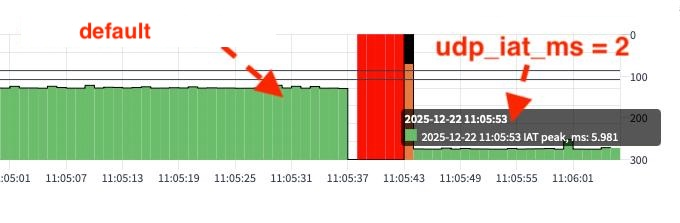
udp_iat_ms = 2
parameter to configure the Inter-Arrival Time (IAT) metric for the outgoing UDP multicast stream. use this parameter if you need to bypass TV-network analyzer controls.