Processing Control
When encoder (vMix, OBS etc) connects to the server then Line shows “green”- icon and info about processing (this values updates every 3 seconds) :
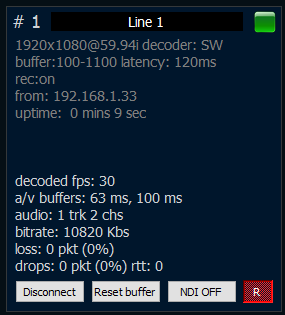
The following information is displayed at the top:
-frame size and fps
-decoder type: SW means software , HW means hardware
- start and max buffer- effective SRT latency
-IP address of encoder side (it will be 127.0.0.1 for proxy mode connection)
uptime
stream info (i): hover the green status square to see the stream passport — source, video/audio parameters, and the decoder. For SRT it also shows live mode, latency, RTT, receive rate, packets, lost, retransmit and dropped. HLS and file sources have no SRT block.
When SDI Out is running for this line, an SDI badge shows the device and format under the line name (it stays visible even if the incoming stream is off). A running restream shows an RE badge. The SDI badge is not clickable; use the SDI Out Addon window. Click re to open restream.
The following information is displayed at the bottom:
** — decoded fps** – shows info about decoded fps. For good network it should be same as input fps. For unstable network this value will be jumped.
** — a/v buffers**– shows how many frames wait output in buffer. It depends on “Max.Delay” value.
** — bitrate**– shows info about input bitrate.
** — loss**– shows the number of lost packets
** — drops**– shows the number of dropped packets
Buttons:Disconnect – use it for stop stream. After disconnect the server will ready accept new connection for this line.
Reset buffer – use if for drop all frames from buffer. It allows got real-time.
NDI OFF– use if for pause NDI processing.
R– start/stop recording (dumping)