SRTStreamer (Lite)
SRTStreamer - it is a software encoder for transfering the stream to the SRTMiniServer by SRT protocol.
Also it allows play feedback from SRTMiniServer, so you can use it for two-way communications.
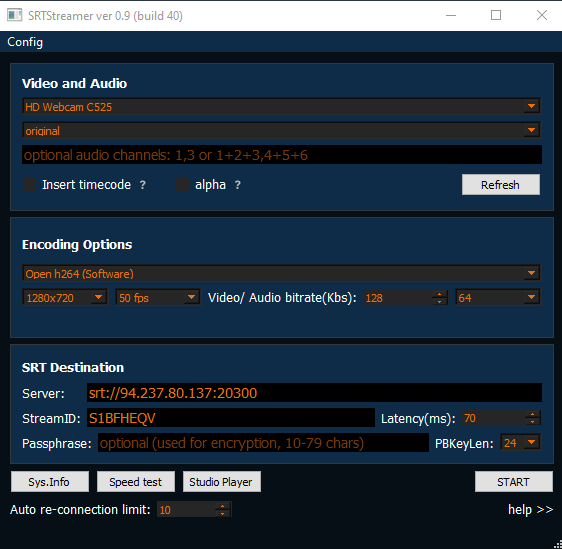
The main menu of the SRTStreamer consists of 3 main sections:
Video and Audio - allows to select sources for video stream
Encoding Options - allows to select encoding option for video stream(codec, video/audio bitrate, video resolution etc.)
SRT Destination - allows to select and add the connection parameters to the SRTMiniServer.
See also
- Instruction how to stream from SRTStreamer to SRTMiniServer you can find on the “Quick start” page in
“Location side” section
- about run SRTStreamer by Command Line see here
“Video and Audio” section
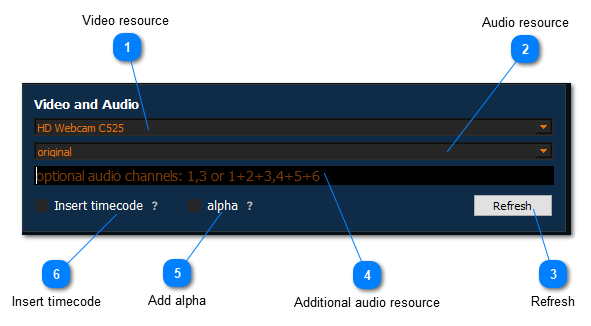
Video resource
User this drop-down to select video source for the stream (you can use devices(camera) or NDI sources).
Audio resource
User this drop-down to select the audio source for the stream.
Refresh
User this button to refresh the list of sources in
“Select Video” and “Select Audio
" drop-downs after adding/removing them.
Additional audio resource
Use this input field for adding additional audio channels in the stream.
Add alpha
Use his checkbox to add sending alpha channel. More details on how to use this option is described here .
Insert timecode
Use this checkbox to add timecodes to the video stream. More details on how to use this option is described here .
“Encoding Options” section:
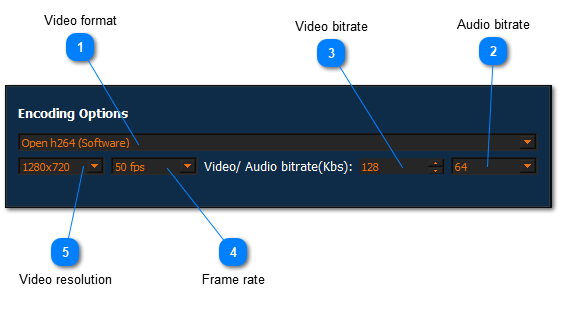
Video format
Use this drop-down to select video encoding format(codec). The following options are available in the list for selection:
Intel Quick Sync(Software)
NVidia NVEncoder(Hardware)
Open h264(Software)
mpeg-2
HEVC Nvidia(Hardware)
Audio bitrate
Use this drop-down to slelect audio bitrate fot the stream. The following options are available for selection:
64 Kbs
128 Kbs
256 Kbs
512 Kbs
1024 Kbs
Video bitrate
Use this input field to slelect video bitrate fot the stream.
Frame rate
Use this drop-drop down to select the appropriate FPS(frames per second) for the video stream.
Video resolution
Use this drop-down to select the resolution with which you will broadcast the video stream to the SRTMiniServer. The following options are available for selection:
1280x720
1920x1080
3840x2160
4096x2160
original
“SRT Destination” section
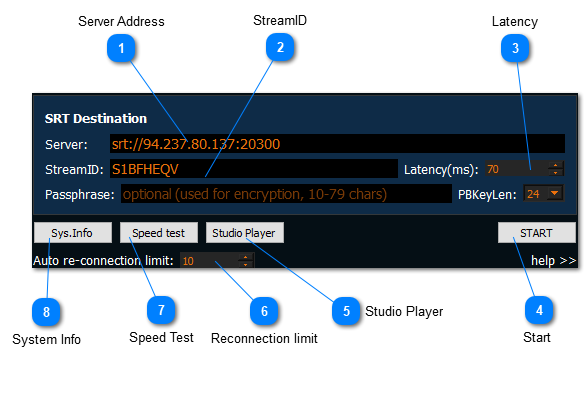
Server Address
Use this input field to set the server IP Address to connect to SRTMiniServer.
StreamID
Use this input field to set the ID for connecting to the particular line in SRTMiniServer. Stream ID is like password. Type any value (latin chars and digitals)
Latency
Use this input field to set latency for the stream. “Latency” is treatment time for each sicked packet. High value means more chance to repair sicked packet. More details about latency you can find here
Start
Use this button to start a streaming.
Studio Player
Use this button to open Studio Player. Studio Player is a tool that allows to organize reverse communication from SRTMiniServer to SRTStreamer using “Cross lines” or “Conference Addon” .
Reconnection limit
Use this input field to set the number of attempts to automatically connect to SRTMiniServer in case something goes wrong with the connection (disconnect from SRTMiniServer)
Speed Test
Use this button for detection incoming/outgoing speed of Internet connection. More details about using this button you can find here .
System Info
Use this button to view all system parameters.