Caller-configuration for HLS / RTMP / RTSP
You can also receive stream by links in HLS / RTMP / RTSP format.
The received signal can be sent to SDI / NDI or recording.
https://youtu.be/vw5IJwOu23I?si=Gc7QCv1fHFkR5APa
Such a Line will be almost no different from lines with SRT signal except for the following points:
such a signal cannot be re-routed through CrossLine
such a signal cannot be sent on UDP Multicast
We also recommend to disable automatic buffer reset (by setting the right value to zero as in the picture). This is due to the fact that HLS can come in large chunks and for smooth processing it is necessary to have a large buffer.
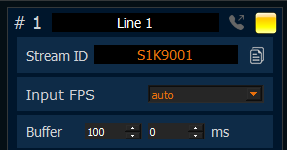
use zero for disable auto-reset of buffer
Configuration
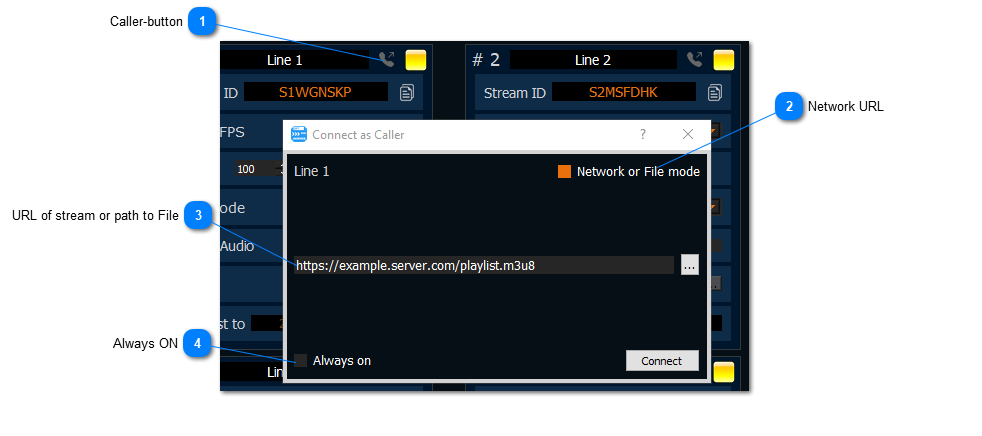
Caller-button
press it for activate “Connect as Caller” dialog
Network URL
turn on it for switch to this Network URL mode.
URL of stream or path to File
provide a link to the network stream. You can type HLS / RTMP / RTSP link. Also you can type file name.
Always ON
turn on it if you need be connected always. The app will try be connected forever.