Direct connection from the Internet
If you have not public IP or have not ability for port-forwarding then please use other way – ProxyAddon
for accept direct connections from INTERNET (for example from stadium or other country) please check this points:
Your “Studio” has public IP. We provide dynamic DNS name like “demo123.rtmpminiserver.com ” . It will be auto linked to this IP. (see below about DNS )
Router has configuration: all incoming connections from Internet to port 9001 of router transfer to PC with SRT MiniServer. Without this rule your router doesn’t known how handle ** UDP** traffic to 9001 port. ** This called “”Port Forwarding” or “”Virtual Servers”.**
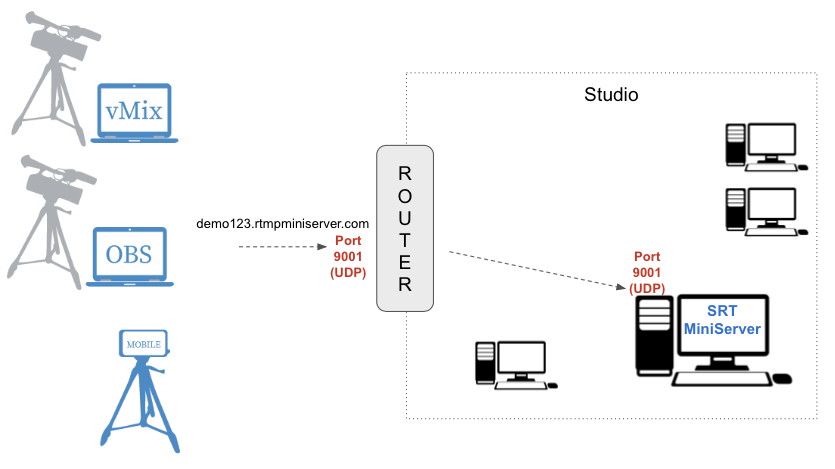
router should known how to handle incoming connections
Examples:
Example A: you install SRT MiniServer on PC with local ip 192.168.1.5 and setup Listen port as 9001. So you need setup port forwarding for router: inbound UDP connection to 9001 port send to 192.168.1.5:9001.
Example B: you install SRT MiniServer on PC with local ip 192.168.1.5 and setup Listen port as 7777.So you need setup port forwarding for router: inbound UDP connection to 1935 port send to 192.168.1.5:7777.
Many routers called this feature as “Port Forwarding” or “Virtual Servers”.
About DNS name
By default we provide auto generated name like abcXXXX.rtmpminiserver.com linked to your IP.
Let me note: you can use it or not.
For example, you can use IP based URL as well as this DNS name:
Example: srt://291.222.122.290:9001 instead srt://abcXXXX.rtmpminiserver.com:9001
Also you can create A-record for your domain and use something like this: srt://mystudio.mycompany.com:9001