Stress Test Tool
We got many questions about PC requirements for SRTMiniServer.
You can read this post about theory.
But it’s not provide answer for this question:
NOTE: Can my PC with SRTMiniServer handles 8 SRT feeds simultaneously where every feed is FullHD@30fps/10Mbs ?
For this we create special tool called SRTStressTool. It’s easy way for imitate many SRT feeds.
Step 1
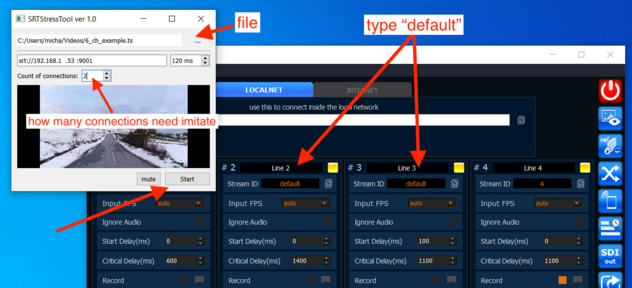
Prepare file with your content. In our example it should be FullHD@30fps with 10Mbs bitrate.Our tool will send this file “as is” (without transcoding).We recommend use duration 2-5 mins. Anyway our tool will play this file by loop.
NOTE: you can use record option in SRTMiniServer for dump feed from encoder.
Step 2
Start SRTMiniServer on your PC and type “default” for 8 lines or use top menu–>Quick Actions–>Ingore Stream IDS
Step 3
Add NDI sources from SRTMiniServer to vMix or other app for activate NDI workflow.Or you can run few NDI Studio Monitor.
Be aware: if you ignore this step then your test it’s not true because NDI encoding/decoding will be not-active.
Step 4
Download SRTStressTool by this link and install it
Run SRTStressTool and
select your file (from Step 2)
type SRT url
type count of feeds for imitate (8) and press Start
SRTStressTool
Result
You can open Task Manager and check CPU , Memory , GPU perfomance and got answer for your question.