RE-Stream Addon
RE-Stream Addon: SRT to RTMP forwarding without video transcoding.
Work without video transcoding. It means you can “multiply” the incoming signal without heavy load on the PC
Possibility of re-streaming one stream in several directions with different audio channels
Base workflow
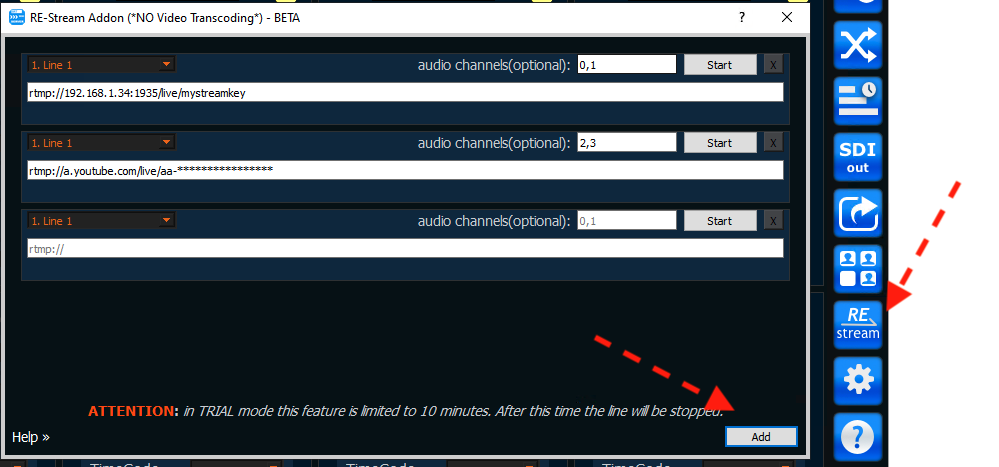
run RE-Stream Addon
use Add button for add new output
select Line, type destination RTMP-address and press Start button.
NOTE: you can type not only RTMP destination. We use ffmpeg directly for this Addon so you can try use SRT and other protocols also.
Audio-channels selection
The most common version of RTMP protocol supports only 2 audio channels, so if you do not specify the audio_channels field, the first two channels will be sent.
But RE-Streamer addon allows you to explicitly specify which channels should be taken.
Simple case (all audio channels in one track)
Usually ncoming SRT signal contains one audio track, which may contain several audio channels.
This is easy to understand on Line’s statistics.
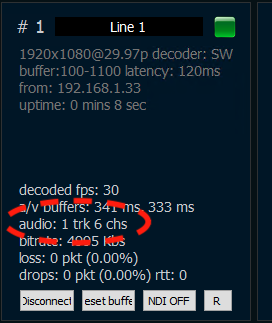
one track with 6 channels
So you can use simple notation:
0,1 or 3,3 for example.
NOTE: we use zero-based index (0 means first channel)
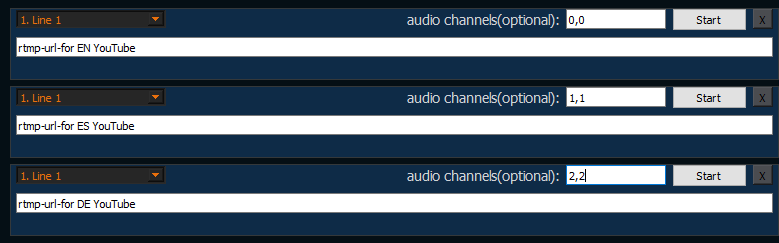
For example, if the input stream has the following channels: 0-English,1-Spanish,2-German then you can send the signal to 3 YouTube channels
Multi-track case (many audio tracks)
Sometimes the signal provider may send an SRT stream in which the audio channels are separated by tracks.
This is easy to understand on Line’s statistics.
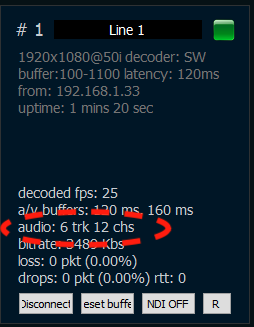
6 tracks, total channels - 12.
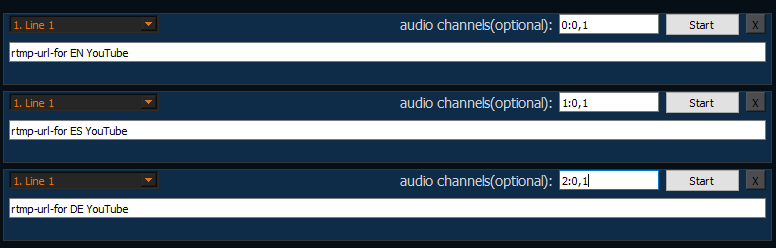
In this case, you need to explicitly specify the track number with such notation
0:0,1
2:0,1
NOTE: we use zero-based index for tracks also (0 means first track)
Suppose a media provider gives us an SRT signal where the first track has two channels in English, the second track has two channels in Spanish and the third track in German.
And we need to send them to the corresponding YouTube channels. In this case we need to use this configuration: