Play from VDO.Ninja
EXPERIMENTAL FEATURE
IMPORTANT: Currently only stream reading with ** H264** video codec is supported. We plan add other video codecs soon.
VDO.Ninja Side
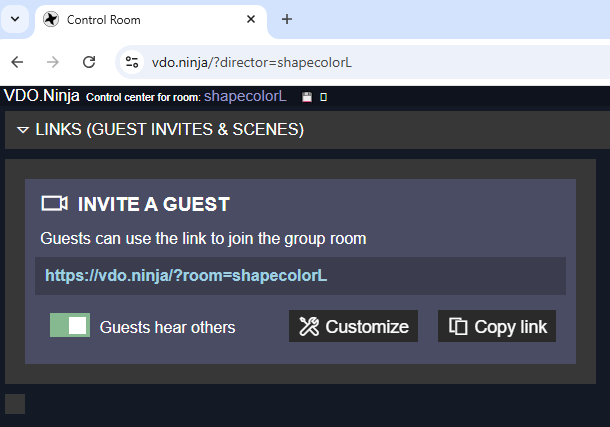
When you create a room in VDO.Ninja , the link to invite a guest usually looks like this:
https://vdo.ninja/?room=shapecolorL
If you want to be able to receive a stream from this guest also via WHEP, you need to add additional parameters to this link:
“&contenthint=detail&codec=h264&fps=25&whepout=guest1viewkey789”
Explanation:
contenthint=detail for fix frame size
codec=h264 for fix codec
fps=25 recomendation for fps (you can use 30 or other values)
whepout=guest1viewkey789 unique name for the WHEP stream from this guest. It must be unique among all such in VDO.Ninja
so the full link for invite guest will be:
https://vdo.ninja/?room=shapecolorL&contenthint=detail&codec=h264&fps=25&whepout=guest1viewkey789
NOTES: for those guests from whom you do not need a WHEP stream, you can use a regular invite link
SRTMiniServer Side
The WHEP link for this guest (with guest1viewkey789 ) looks like this:
https://whep.vdo.ninja/guest1viewkey789
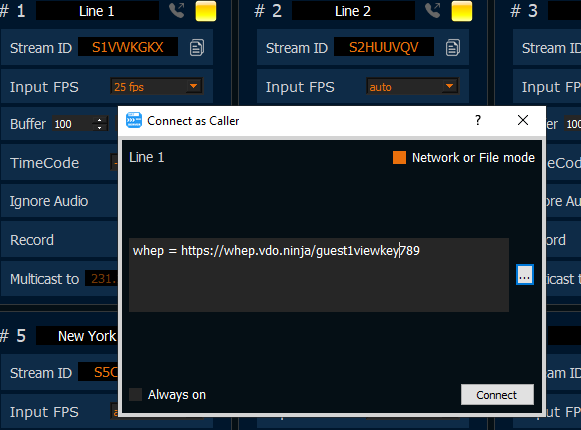
So just use this notation in Caller-dialog:
whep = https://whep.vdo.ninja/guest1viewkey789
NOTES: we also recommend explicitly setting the Input FPS field (in our case, 25)