Settings Window
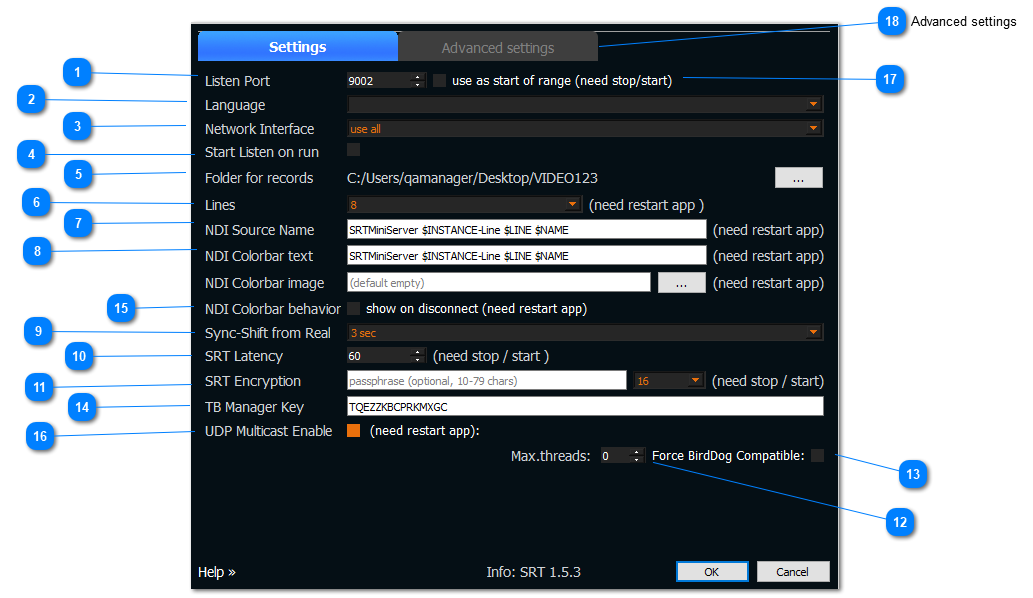
Listen Port UPD/TCP port. Default is 9001. Need restart server after change.
Language allows to set the server interface language
Network interface
allows to select the network card of the computer through which the Internet will be transmitted.
If you are not sure which card you need, choose “use all” option by default
Start listen on run button that allows to have the server always ON all the time when restart the server(The “Start/Stop” button will be always ON if the “** Start listen on run”**button is selected)
Folder for records|allows to select a folder to save the video stream that goes through the lines
Lines allows to select the number of lines that will be displayed on the main screen (The maximum number of lines that is available for selection depends on the purchased license)
NDI Source name allows to specify a name template for the outgoing NDI source
Colorbar text allows to specify a name template for the outgoing NDI source
Sync-shift from Real — during the synchronization process, alignment is done according to the time “ReaTime - Shift”.
SRT Latency — allows to set up latency on both side of connection - encoder and server. More details here: https://srtminiserver.com/srt_info/index.html
SRT Encryption — it’s secret phrase for encrypt your stream. It means you need ~20% overhead for bandwidth.
More details here: https://srtminiserver.com/srt_info/index.html
Max.threads — shows how many threads can be allocated for decoding one feed.
For example 2 means only two threads will be allocated for decoding input feed. Zero means automatically detected.
Force BirdDog Compatible — check this if you plan use hardware BirdDog NDI decoder.
Explanation: NDI allows use different color space (RGB, I420, NV12, UYVU). But BirdDog NDI decoder accept only one – UYVU. So this option force on converting to UYVU color space.
You can change this fields on fly (without Stop server). The server will applies new values for new connections.
TB Manager Key - use it as access key for TalkBackManager addon (see )
NDI Colorbar behavior — turn on if you need show colorbar on disconnect
UDP Multicast Enable — turn on if you need “Multicast to” field on lines
use as start of range — it means the server will use range of ports.
For example for Listen port 9001 and 4 Lines server will use: 9001,9002,9003,9004. Use this if your encoders does not support “stream id” (see here )
Advanced settings
see here