Utility menu
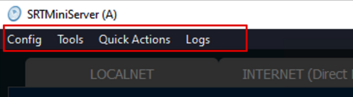 Config:
Save lines Config — allows you to save a file with which you can run SRTMiniServer from command line or by BAT-file with ini-file as parameters. More details here
Load lines Config — allows to use line parameters from the saved file
Tools:
Test NDI Generator
Quick Actions :
Reset Stream IDs allows to generate new stream ID for each line
Ignore Stream IDs allows to reset all stream IDs and apply one id(default) for all lines
Logs:
Open logs folder - allows to open folder with saved reports
Show report - allows to see a report with broadcast logs for each line