NVENC Encoder Missing
Description
Although an NVIDIA GPU is installed in the system, the NVENC encoding option is not available in the list of encoders within SRT Streamer PRO.
Cause
This situation occurs if the NVIDIA graphics card was installed after SRT Streamer PRO was initially set up. During its first launch, the program detects available hardware devices and caches the list. Consequently, any devices added later are not recognized.
Solution
Delete the outdated cache file. This will force SRT Streamer PRO to rebuild the device list from scratch upon its next launch.
IMPORTANT: This cache is used solely by SRT Streamer PRO and the underlying GStreamer framework. It is not a system cache, and deleting it is safe for the operating system.
Close SRT Streamer PRO (if it is running).
Locate the file named
registry.x86_64-msvc.bin.For certainty, use the Windows search function (make sure the search includes system and hidden files).
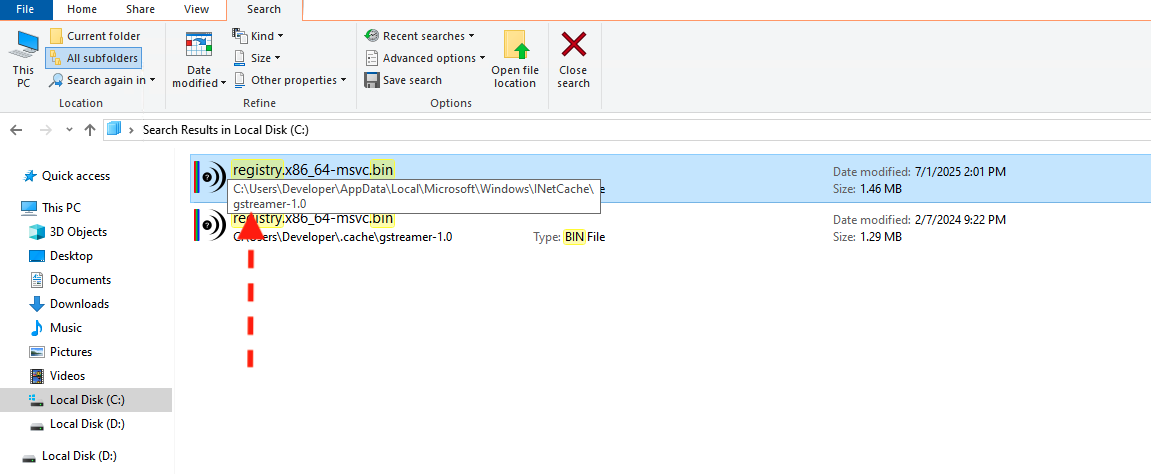
The folder usually has a path containing INetCache/gstreamer-1.0. Delete this file.
Restart the SRT Streamer PRO service
The program will automatically generate a new cache file, which should now correctly include all available encoders, including NVENC.
After completing these steps, the NVENC encoder should appear in the list.