Streaming Setup
When you need to stream several cameras, as a rule all streams have common characteristics:
destination server
format used (fps, frame size)
bitrate
codec used
latency and other SRT params
These common parameters are set in the Profile so that you don’t have to specify them for each stream separately.
You can have up to 6 Profiles, and specify which one to use for each Stream.
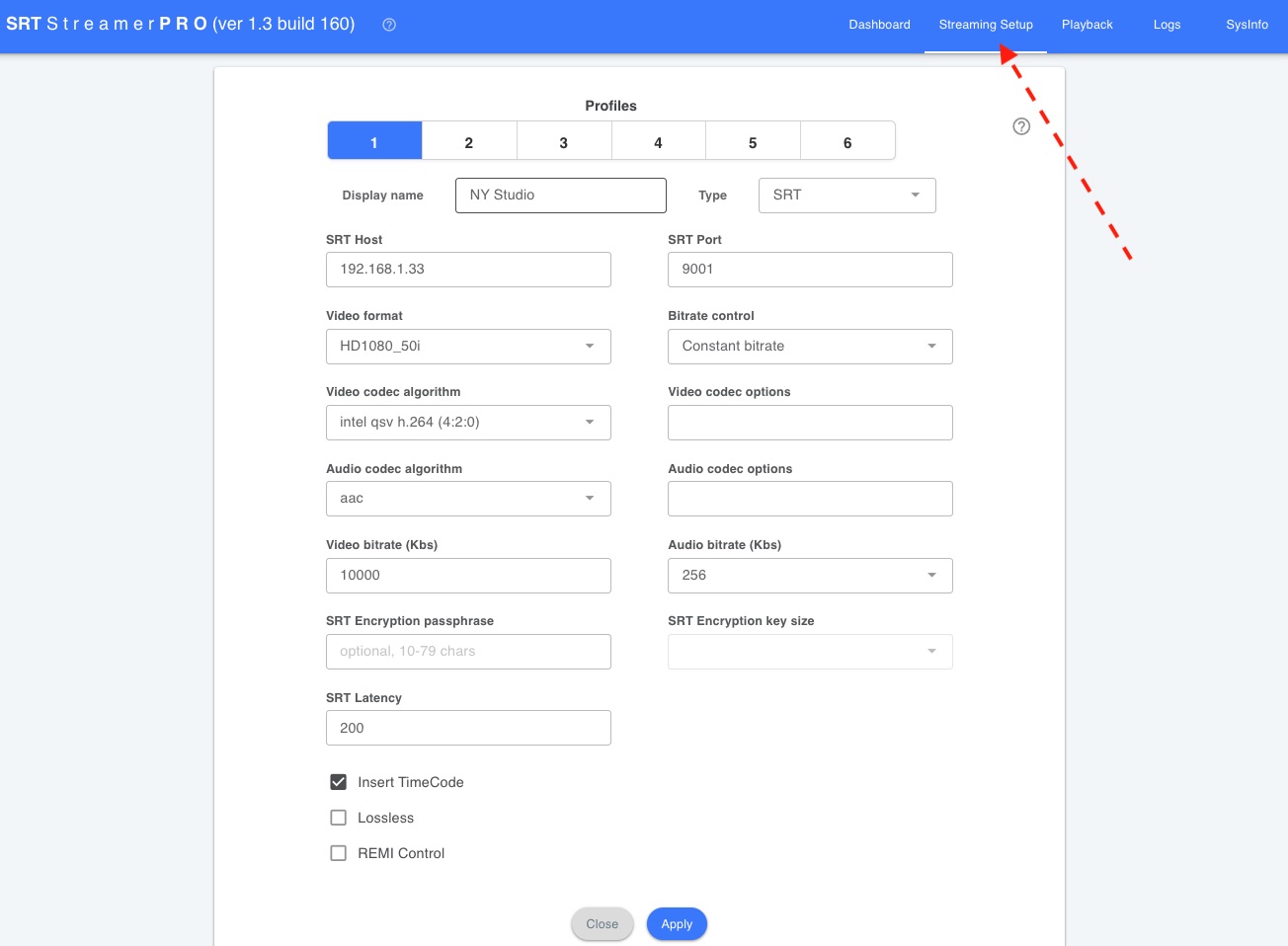
Fill in the profile parameters, then press Apply.
Display name
Label of this profile in the UI (tabs 1–6).
Type
How this profile sends the stream:
- SRT — SRT caller to a host/port
- RTMP — RTMP URL
- Encoding only — encode locally, no network destination
- Bonding — send via RIST uplinks from the Bonding tab (host/port are not set here)
SRT Host / SRT Port
SRT destination (Type SRT). Not used for Encoding only or Bonding.
RTMP URL
RTMP destination (Type RTMP). Example: rtmp://host/app
Video format
Output resolution and frame rate (progressive or interlaced).
Bitrate control
How video bitrate is applied: constant, variable, or adaptive (experimental).
Video codec algorithm
Video encoder (for example hardware NVENC / Intel QSV, or software).
Video codec options
Optional extra encoder parameters (key=value, space-separated). See Video Codec Options
for NVENC and Intel QSV.
Audio codec algorithm / Audio codec options
Audio encoder and optional extra parameters (key=value).
Video bitrate (Kbs) / Audio bitrate (Kbs)
Target video and audio bitrate.
SRT Encryption passphrase / SRT Encryption key size
Optional SRT encryption (Type SRT). Passphrase: 10–79 characters. Key size is used only if a passphrase is set.
SRT Latency
SRT latency in milliseconds (Type SRT). Ignored if Lossless is on.
Output networks
Which NIC to use for SRT / RTMP output. Bonding profiles use the NIC list on the Bonding tab instead.
Insert TimeCode*
Adds timecode for synchronization between multiple cameras. A KLV stream is used.
Lossless*
Special lossless SRT mode (Type SRT). SRT will deliver every packet. SRT Latency is ignored.
If the connection is good, this mode may provide faster delivery.
REMI Control*
Reads Tally info and PTZ commands from the server and forwards them to the camera (SRTMiniServer 2.4.5+). (more »)
* Compatible only with SRTMiniServer.