Playback
SRT Streamer PRO is not only an encoder — it also supports return video from the Studio. You can receive an SRT signal from the remote side and play it out locally.
This two-way communication makes it easy to set up teleconferences and telebridges: you send camera feeds to the Studio while receiving return feeds (talkback, program, multiview, etc.) on site.
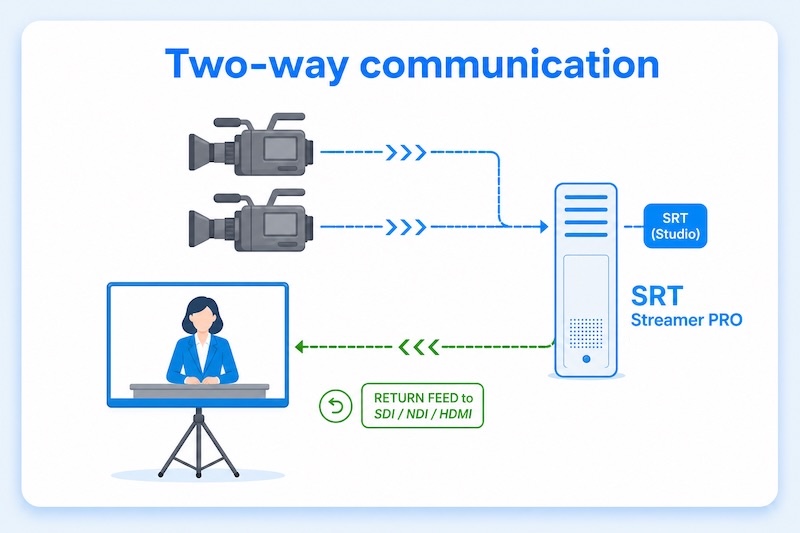
You can play up to two streams at the same time and output them to SDI, NDI, or HDMI devices.
Configuration
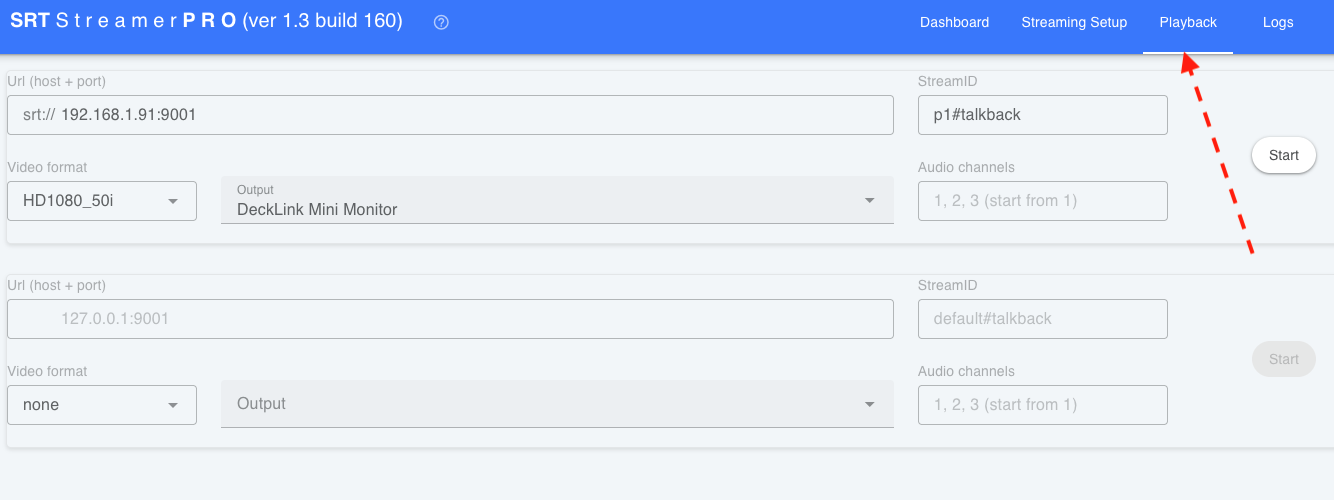
Open the Playback tab in the web interface. Each playback slot has the following fields:
Url (host + port) — SRT server address. Example:
srt://192.168.1.91:9001Stream ID — stream identifier on the server (if required). Example:
p1#talkbackVideo format — output video format (resolution and frame rate). Example:
HD1080_50iOutput — local playback device (SDI, NDI, or HDMI). Example:
DeckLink Mini MonitorAudio channels — audio channels to play out (counting starts at 1). Example:
1,2,3
Click Start to begin playback for the selected slot.