Why yt-dlp is needed
There are many video platforms, each with its own web pages and players. Reading those pages reliably takes a tool that keeps up with frequent changes.
yt-dlp is a well-established open-source project built for this work. It is updated frequently as platforms change and new ones appear, so VPI uses it to work with video pages.
For licensing and maintenance reasons, yt-dlp is not included with VPI. Keeping it separate also makes updates easier: when a platform changes, you can update yt-dlp without reinstalling the whole VPI application.
Install yt-dlp on Windows
On Windows, add yt-dlp in four short steps.
Open the yt-dlp releases .
Under Assets, download yt-dlp.exe, the file shown in the picture.
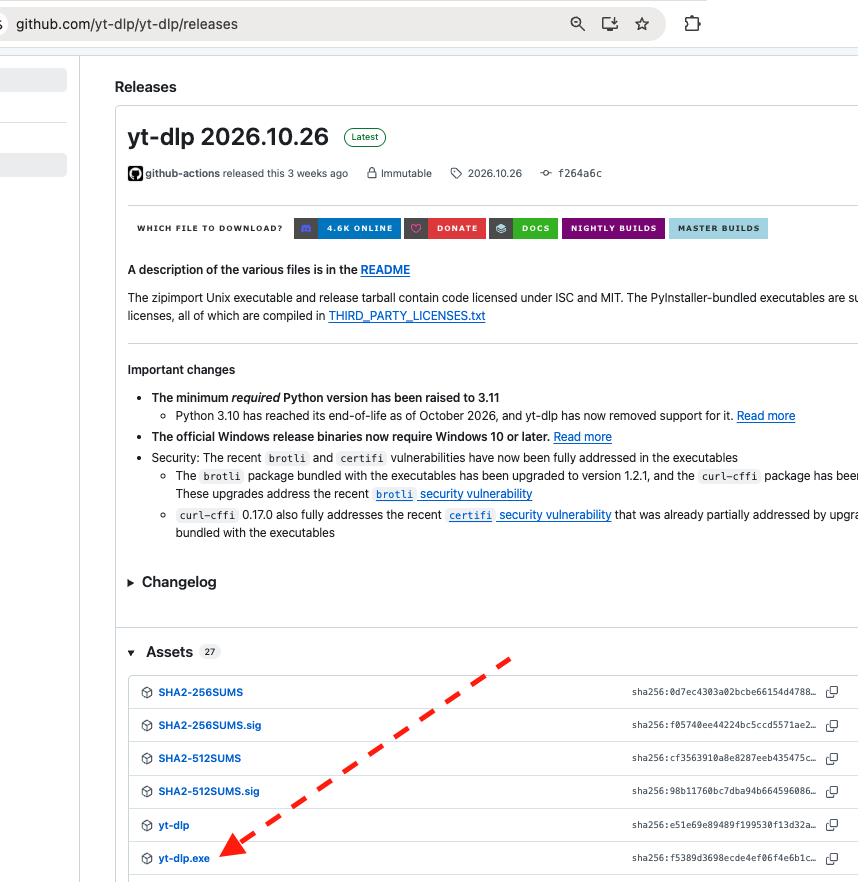
NOTE: yt-dlp.exe is ready to use. It does not need an installer. Just save it somewhere on your disk, then point to that location in the next step.
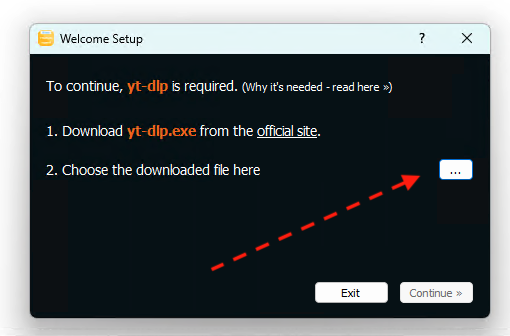
In Welcome Setup, press … and choose that file. VPI remembers the path.
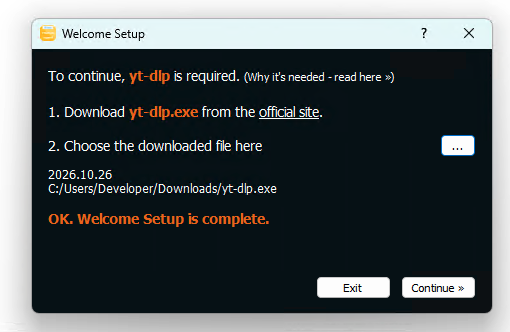
VPI tries to run the yt-dlp you selected. If everything is fine, you will see OK. Welcome Setup is complete. Then press Continue.